
We understand how important it is for all our users to know exactly what works before they make the jump on any new updates. Please refer to this article for all AIR Music Tech software compatibility with macOS 14 Sonoma.
This page will be updated regularly to reflect any updates to product compatibility as testing is completed. We encourage all our users to remain on their current OS until all necessary software products have been qualified for support.
Supported Software
All compatibility testing for macOS 14 Sonoma is performed on Intel and base-level Apple Silicon processors.
Any product not listed below is not considered to be supported with macOS 14 Sonoma systems or Apple Silicon processors.
AIR Instrument Plugins | ||||||||
| Product | Version | Intel Processor | Apple Silicon | VST2 | VST3 | AU | AAX | Auth Type |
| Bassline | 1.2.1.14 | Supported | Supported | ✓ | ✓ | ✓ | ✓ | inMusic |
| DrumSynth | 1.2.1.14 | Supported | Supported | ✓ | ✓ | ✓ | ✓ | inMusic |
| Electric | 1.2.1.14 | Supported | Supported | ✓ | ✓ | ✓ | ✓ | inMusic |
| Essential Keyboards | 2.1.1 | Supported | Supported | ✓ | ✓ | ✓ | ✓ | inMusic |
| Fabric | 1.2.1.14 | Supported | Supported | ✓ | ✓ | ✓ | ✓ | inMusic |
| Fabric Vintage Jup | 1.0.0.35 | Supported | Supported | ✓ | ✓ | ✓ | ✓ | inMusic |
| Fabric Vintage Memorymoog | 1.0.0.35 | Supported | Supported | ✓ | ✓ | ✓ | ✓ | inMusic |
| Fabric Vintage Pro | 1.0.0.35 | Supported | Supported | ✓ | ✓ | ✓ | ✓ | inMusic |
| Flavor Pro | 1.2.0.8 | Supported | Supported | ✓ | ✓ | ✓ | ✓ | inMusic |
| Hype | 1.2.1.14 | Supported | Supported | ✓ | ✓ | ✓ | ✓ | inMusic |
| Iona | 1.0.0.30 | Supported | Supported | ✓ | ✓ | ✓ | ✓ | inMusic |
| Jura | 1.2.1.14 | Supported | Supported | ✓ | ✓ | ✓ | ✓ | inMusic |
| Mellotron | 1.2.1.14 | Supported | Supported | ✓ | ✓ | ✓ | ✓ | inMusic |
| Mini D | 1.2.1.14 | Supported | Supported | ✓ | ✓ | ✓ | ✓ | inMusic |
| Odyssey | 1.2.1.14 | Supported | Supported | ✓ | ✓ | ✓ | ✓ | inMusic |
| OPx-4 | 1.2.1.14 | Supported | Supported | ✓ | ✓ | ✓ | ✓ | inMusic |
| Organ | 1.2.1.14 | Supported | Supported | ✓ | ✓ | ✓ | ✓ | inMusic |
| Ring The Alarm | 1.0.0.41 | Supported | Supported | ✓ | ✓ | ✓ | ✓ | inMusic |
| Solina | 1.2.1.14 | Supported | Supported | ✓ | ✓ | ✓ | ✓ | inMusic |
| Stage EP | 1.2.1.14 | Supported | Supported | ✓ | ✓ | ✓ | ✓ | inMusic |
| Stage Piano | 1.2.1.14 | Supported | Supported | ✓ | ✓ | ✓ | ✓ | inMusic |
| Studio Strings | 1.2.1.14 | Supported | Supported | ✓ | ✓ | ✓ | ✓ | inMusic |
| Sub Factory | 1.2.1.11 | Supported | Supported | ✓ | ✓ | ✓ | ✓ | inMusic |
| TimewARP 2600 V2 | 2.0.1.16 | Supported | Supported | ✓ | ✓ | ✓ | ✓ | inMusic |
| TubeSynth | 1.2.1.14 | Supported | Supported | ✓ | ✓ | ✓ | ✓ | inMusic |
AIR Effects Plugins | ||||||||
| Product | Version | Intel Processor | Apple Silicon | VST2 | VST3 | AU | AAX | Auth Type |
| Tape Double Track | 1.0.0.25 | Supported | Supported | ✓ | ✓ | ✓ | ✓ | inMusic |
| Tape Echo | 1.0.0.170 | Supported | Supported | ✓ | ✓ | ✓ | ✓ | inMusic |
| Tape Saturator | 1.0.0.170 | Supported | Supported | ✓ | ✓ | ✓ | ✓ | inMusic |
| Fly Tape II | 1.0.0.27 | Supported | Supported | ✓ | ✓ | ✓ | ✓ | inMusic |
| Lo-Fly Dirt | 1.0.0.55 | Supported | Supported | ✓ | ✓ | ✓ | ✓ | inMusic |
| Multiband Filterbank | 1.0.0.37 | Supported | Supported | ✓ | ✓ | ✓ | ✓ | inMusic |
| Creative FX Collection 2 | 1.2.1.14 | Supported | Supported | ✓ | ✓ | ✓ | ✓ | inMusic |
| Soft Clipper | 1.2.0.8 | Supported | Supported | ✓ | ✓ | ✓ | ✓ | inMusic |
| Jura Chorus | 1.2.0.10 | Supported | Supported | ✓ | ✓ | ✓ | ✓ | inMusic |
| Ether | 1.2.0.10 | Supported | Supported | ✓ | ✓ | ✓ | ✓ | inMusic |
| Sprite | 1.2.0.10 | Supported | Supported | ✓ | ✓ | ✓ | ✓ | inMusic |
| Delay Pro | 1.2.0.5 | Supported | Supported | ✓ | ✓ | ✓ | ✓ | inMusic |
| Vocal FX Collection | 1.2.1.14 | Supported | Supported | ✓ | ✓ | ✓ | ✓ | inMusic |
| Flex Beat | 1.1.0 | Supported | Supported | ✓ | ✓ | ✓ | ✓ | inMusic |
| Flavor Pro | 1.2.0.8 | Supported | Supported | ✓ | ✓ | ✓ | ✓ | inMusic |
Classic AIR Instruments & Effects Plugins | ||||||||
| Product | Version | Intel Processor | Apple Silicon | VST2 | VST3 | AU | AAX | Auth Type |
| AIR Creative FX Collection Plus | 2.0.0 | Supported | Supported | ✓ | ✓ | ✓ | * | inMusic |
| Boom | 1.4.0 | Supported | Supported | ✓ | ✓ | ✓ | * | inMusic |
| DB33 | 1.4.0 | Supported | Supported | ✓ | ✓ | ✓ | * | inMusic |
| Hybrid 3 | 3.2.0 | Supported | Supported | ✓ | ✓ | ✓ | ✓ | inMusic |
| Loom II | 2.2.0 | Supported | Supported | ✓ | ✓ | ✓ | ✓ | inMusic |
| Mini Grand | 1.4.0 | Supported | Supported | ✓ | ✓ | ✓ | * | inMusic |
| Strike | 2.6.0 | Supported | Supported | ✓ | ✓ | ✓ | ✓ | inMusic |
| Structure | 2.2.0 | Supported | Supported | ✓ | ✓ | ✓ | ✓ | inMusic |
| The Riser | 1.2.0 | Supported | Supported | ✓ | ✓ | ✓ | ✓ | inMusic |
| Transfuser | 2.2.0 | Supported | Supported | ✓ | ✓ | ✓ | ✓ | inMusic |
| Vaccum Pro | 1.2.0 | Supported | Supported | ✓ | ✓ | ✓ | ✓ | inMusic |
| Velvet | 2.2.0 | Supported | Supported | ✓ | ✓ | ✓ | ✓ | inMusic |
| Xpand!2 | 2.4.0 | Supported | Supported | ✓ | ✓ | ✓ | * | inMusic |
| Vacuum Classic | 1.4.0 | Supported | Supported | ✓ | ✓ | ✓ | * | inMusic |
- * - AAX Available via Avid Link - Click HERE to learn more
- To learn more about inMusic Authentication for Classic AIR Plugins, see THIS support page
If you have any questions or concerns about the compatibility of our products with macOS 14 Sonoma, please do not hesitate to contact our customer support team for assistance. We are here to help and are committed to providing the best possible experience for our customers.
How do I prevent my system from updating automatically?
Please be sure to check that your operating system is not enabled to update itself automatically. While this can be a useful feature for some, anyone who relies on the stability of their software and hardware tools should prefer control over which base operating system is installed on their system. Automatic updates will not account for software compatibility before updating which could lead to problems with stability and other functionality if your gear is not ready for the changes in the operating system.
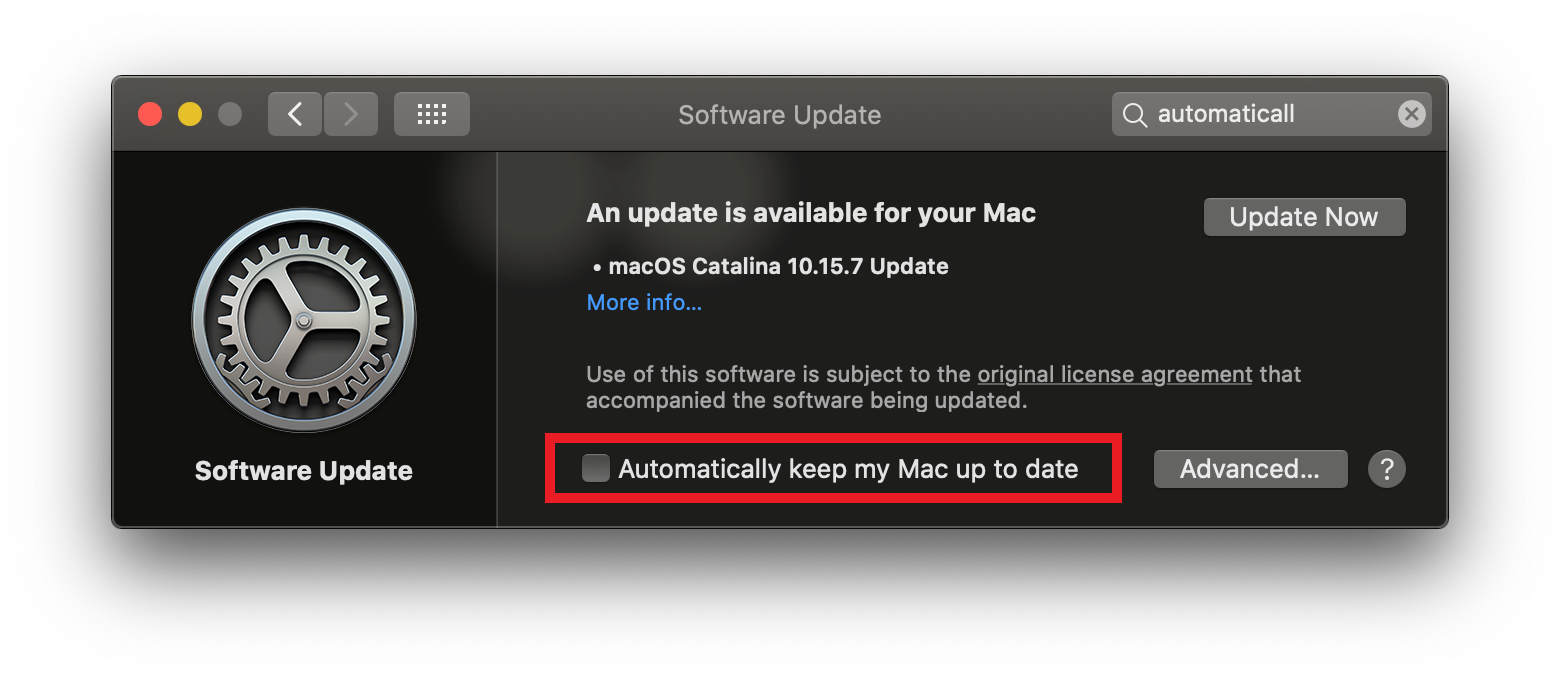
To avoid any delays or downtime, it's best to be deliberate with the decision to update and use the opportunity to check that all your software and hardware tools will be compatible before making the jump. To turn off automatic updates for macOS, please do the following:
1) Navigate to System Preferences > Software Update
2) Uncheck the box next to Automatically keep my Mac up to date.
Was this article helpful?
That’s Great!
Thank you for your feedback
Sorry! We couldn't be helpful
Thank you for your feedback
Feedback sent
We appreciate your effort and will try to fix the article