
When attempting to trial an AIR Music plugin for the first time, some users may experience intermittent alerts and white noise. This is caused when the plugin is run Unlicensed instead of via the full 10-day trial license.
This guide will show you how to identify if you are running the Unlicensed version of your plugin and how to correct this.
TABLE OF CONTENTS
- How to activate your 10-day trial?
- How can I tell if I'm running an Unlicensed version of my plugin?
- My plugin is currently Unlicensed. How can I start the trial?
How to activate your 10-day trial?
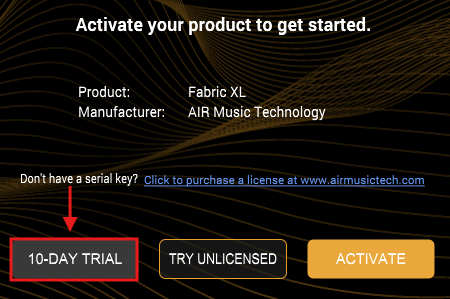
When downloading and running your AIR Music Tech plugin trial for the first time, you will be greeted with a screen to activate your plugin.
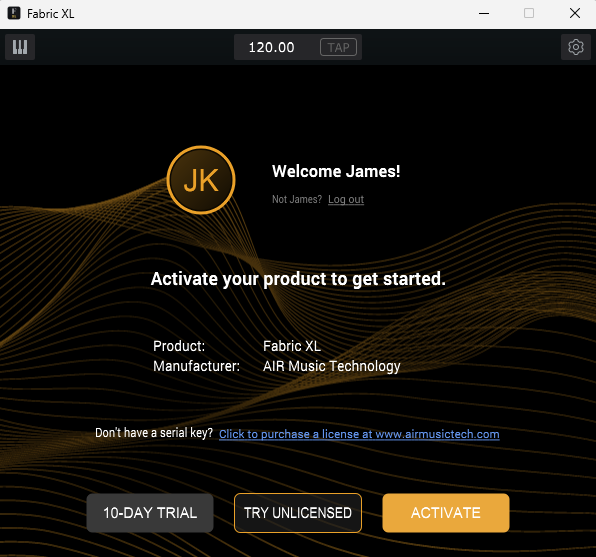
Please ensure you click the 10-DAY TRIAL icon
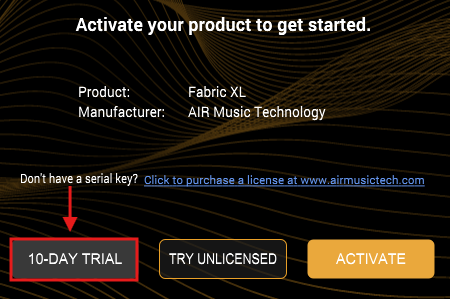
This will begin to register the trial license to your account

How can I tell if I'm running an Unlicensed version of my plugin?
Including the intermittent audio cues, you will see an icon in the top-right corner of most plugins showing "UNLICENSED".
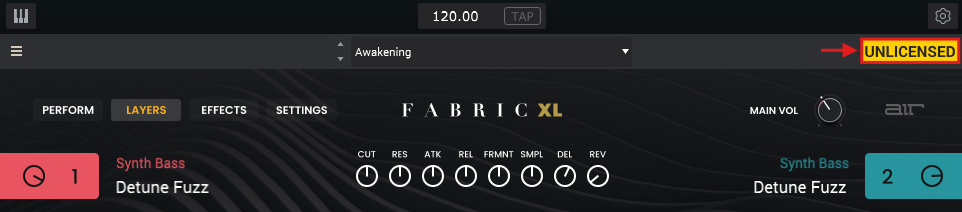
My plugin is currently Unlicensed. How can I start the trial?
To change the Unlicensed version to the full 10-day trial, please follow the steps below:
- Open your unlicensed AIR Music Tech plugin
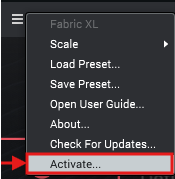
- Click on the three-bar ☰ menu icon
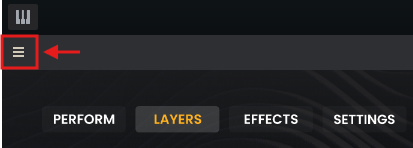
- Select Activate
- Select the 10-DAY TRIAL
- Allow the trial registration to complete
- Enjoy diving into your AIR plugin!
Was this article helpful?
That’s Great!
Thank you for your feedback
Sorry! We couldn't be helpful
Thank you for your feedback
Feedback sent
We appreciate your effort and will try to fix the article